
 Anthropic
Claude is the AI assistant built by Anthropic, an AI safety company founded in 2021 by a group of former OpenAI researchers. Where many chatbots chase headlines with raw speed or viral image tricks, Claude has quietly earned a reputation as the thoughtful one in the room, the assistant professionals reach for when the task involves long documents, careful reasoning, nuanced writing, or production-grade code.
That reputation is not an accident. Anthropic builds Claude around a method it calls Constitutional AI, designed to make the model helpful and honest while pushing back on harmful or misleading requests. The result is an assistant that feels less like an autocomplete engine and more like a capable, level-headed collaborator that will tell you when it is unsure rather than confidently inventing an answer.
This guide breaks down everything that matters about Claude in 2026: the model family and how to pick a tier, the features that set it apart, how it stacks up against ChatGPT and Gemini, what the plans actually cost, and the real-world workflows where it shines. By the end you will know exactly when Claude is the right tool to open, and when it is not.
What Is Claude?
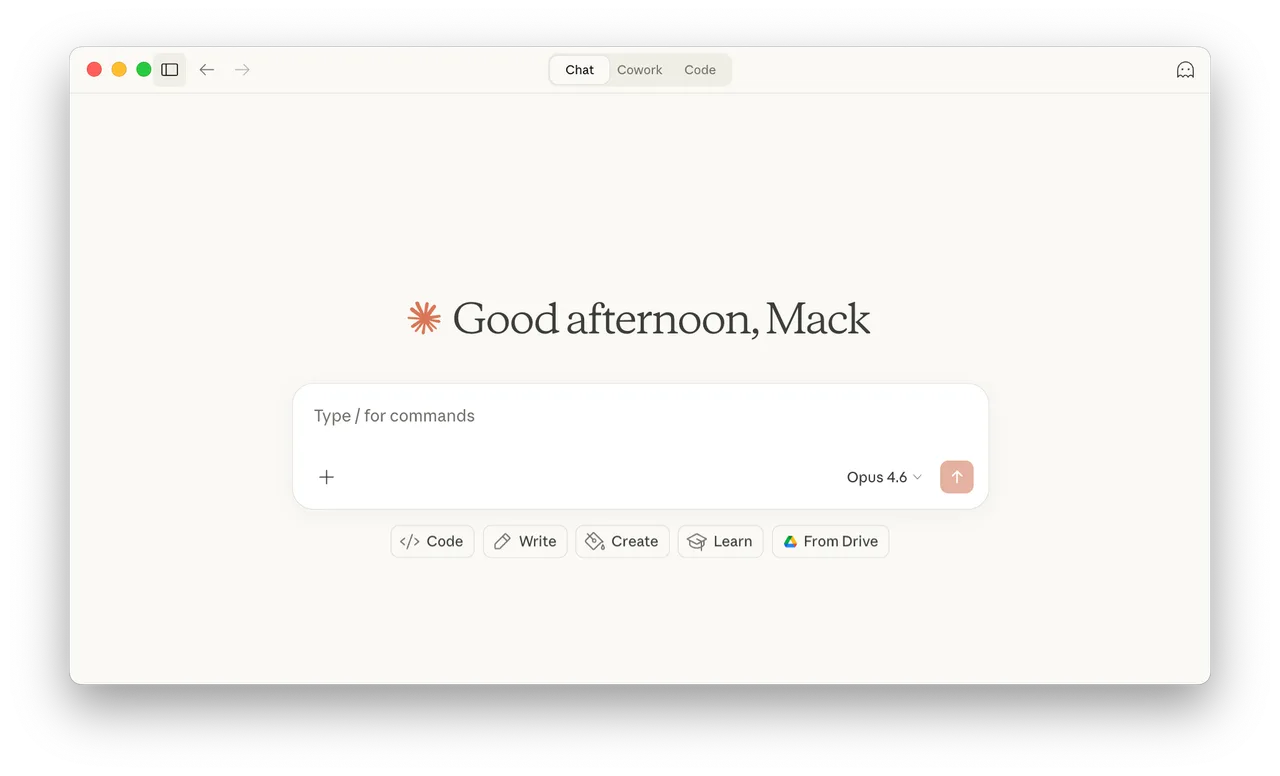
Claude is a family of large language models accessible through a web app at claude.ai, native desktop and mobile apps, a browser extension, and a developer API. You talk to it in plain language and it writes, summarizes, analyzes, codes, brainstorms, translates, and reasons through problems alongside you. It is named after Claude Shannon, the mathematician widely regarded as the father of information theory.
What makes Claude distinct is its temperament. Anthropic has deliberately tuned it for long-context comprehension, careful step-by-step reasoning, and writing that reads like a human wrote it rather than a template filled it in. It is consistently rated among the best models for serious writing and for software engineering, and it has become a default choice inside many companies precisely because it is steady, transparent about uncertainty, and hard to push off the rails.
Crucially, Claude is multimodal on the way in: you can paste or upload text, PDFs, spreadsheets, images, screenshots, and code, and it will read and reason over all of it in a single conversation. It does not generate images or video itself (for that you would use a dedicated tool like DALL·E 3 or Sora), but as a reading, thinking, and writing engine it is among the strongest available.
The Claude Model Family
Claude is not a single model but a tiered family, so you can trade off raw capability against speed and cost. The latest generation (the Claude 4 series) keeps the same three-tier structure that has defined the lineup for years.
| Tier | Best for | Trade-off |
|---|---|---|
| Opus | The most capable tier: deep reasoning, complex coding, long research and analysis where quality matters most. | Highest cost and slightly slower responses. |
| Sonnet | The balanced workhorse: fast, smart, and economical for the vast majority of everyday tasks. | Not quite Opus-level on the hardest problems. |
| Haiku | The speed tier: near-instant answers for simple, high-volume, or latency-sensitive jobs. | Less depth on complex, multi-step reasoning. |
For most people the practical advice is simple: start on Sonnet because it is fast and handles almost everything, and switch up to Opus when you hit a genuinely hard problem (a thorny refactor, a dense legal document, a tricky piece of analysis) where you want maximum care. Haiku is mostly relevant for developers building high-volume applications on the API who need low latency and low cost per call.
Core Features That Set Claude Apart
Beyond the underlying intelligence, Anthropic has layered on a set of features that turn Claude from a chat box into a genuine work surface.
1. A Large Context Window
Claude reads a very large amount of text at once. Its standard context window holds roughly 200,000 tokens, which is on the order of 500 pages or a few full-length books. You can drop an entire contract, a long research paper, a sprawling codebase, or months of meeting notes into a single conversation and ask Claude to reason across all of it without losing the thread. This long-context strength is one of the main reasons knowledge workers gravitate to it.
2. Artifacts: A Live Workspace Beside the Chat
When Claude produces something substantial (a document, a code file, a chart, or a small web app), it opens it in a dedicated side panel called an Artifact rather than burying it in the chat scroll. The Artifact updates live as you ask for changes, so you can iterate on a draft or a piece of code in place. Claude can even run interactive React and HTML Artifacts directly in the browser, letting you preview a working prototype the moment it is written.
3. Projects: Persistent, Context-Rich Workspaces
Projects let you bundle a set of documents, instructions, and chats into one persistent workspace. Upload your brand guidelines, a style guide, a codebase, or reference material once, give Claude custom instructions for how to behave, and every conversation inside that Project inherits the full context. It is the difference between re-explaining your situation every session and having an assistant that already knows the background.
4. Extended Thinking for Hard Problems
For questions that benefit from deliberation, Claude can engage an extended-thinking mode in which it reasons through the problem step by step before answering. This visibly improves accuracy on math, logic, complex coding, and multi-stage analysis, and you can see the reasoning it worked through rather than just the final output, useful for checking its work on anything high-stakes.
5. Connectors and the Model Context Protocol
Claude can reach beyond the chat through connectors that plug it into tools and data sources you already use. Much of this is powered by the Model Context Protocol (MCP), an open standard Anthropic created and released for connecting AI assistants to external systems, which has since been adopted across the industry. In practice this means Claude can search the web, pull from connected apps, and act on live information instead of being frozen at its training cutoff.
6. Vision and File Analysis
Upload a screenshot of a broken UI, a photo of a whiteboard, a chart, a scanned PDF, or a spreadsheet, and Claude will read and interpret it. It can transcribe handwriting, explain a diagram, extract data from a table image, or debug code from a screenshot, making it a practical bridge between the messy visual artifacts of real work and structured, usable text.
Claude for Coding
Claude has become a favorite among developers, regularly topping independent benchmarks for real-world software engineering. Inside the chat it excels at writing, explaining, refactoring, and debugging code across dozens of languages, and the Artifacts panel makes it easy to preview front-end work instantly.
For deeper, agentic work, Anthropic offers Claude Code, a command-line tool that lives in your terminal, reads and edits files across an entire repository, runs commands, and works through multi-step engineering tasks largely on its own. Many developers now treat the Claude chat and Claude Code as two halves of the same workflow: the chat for thinking and planning, Claude Code for executing changes directly in the codebase. Developers who want to build their own products on the models use the Claude API.
How Claude Compares to ChatGPT and Gemini
Claude, ChatGPT, and Gemini are the three assistants most people are choosing between. They overlap heavily, but each has a clear personality.
| Claude | ChatGPT | Gemini | |
|---|---|---|---|
| Greatest strength | Writing quality, long-context reasoning, coding | Broadest feature set: image, voice, large ecosystem | Deep Google integration and real-time search |
| Native image generation | No (reads images, does not create them) | Yes | Yes |
| Tone of writing | Natural, nuanced, least "robotic" | Capable and versatile | Concise and factual |
| Built-in ecosystem | API, Claude Code, MCP connectors | GPTs, voice, broad app store | Workspace, Search, Android |
The short version: choose Claude when the work is reading, thinking, writing, or coding and you want the most careful, human-sounding output. Choose ChatGPT when you want the widest toolbox including image and voice in one place. Choose Gemini when you live inside Google Workspace and want answers grounded in live search. Many professionals simply keep two of the three open and route each task to whichever fits.
Pricing and Plans
Claude is free to start, with paid tiers that raise your usage limits and unlock the most capable models and features. Prices below are the standard published rates; always confirm current pricing on the official site before subscribing.
| Plan | Roughly | Who it is for |
|---|---|---|
| Free | $0 | Casual use: access to capable models with daily usage limits. |
| Pro | ~$20 / month | Individuals: far higher limits, access to the top models, Projects, and more features. |
| Max | from ~$100 / month | Power users: the highest usage limits and priority access for heavy daily work. |
| Team & Enterprise | Custom | Organizations: collaboration, admin controls, and security features for teams. |
Developers pay separately through the API on usage-based pricing, billed per million tokens, with Haiku the cheapest tier and Opus the most expensive. The free plan is genuinely useful for trying Claude out and for light everyday tasks; the jump to Pro is the one most regular users eventually make for the higher limits and access to Opus.
Safety, Honesty, and Constitutional AI
Anthropic's entire identity is built around AI safety, and it shows in how Claude behaves. The model is trained with Constitutional AI, a technique in which the model learns to critique and revise its own responses against a written set of principles (a 'constitution') rather than relying solely on human raters for every judgment. The goal is an assistant that is helpful and honest while declining genuinely harmful requests.
In day-to-day use this translates into two things people notice: Claude is more willing to say "I am not sure" or "I cannot verify that" instead of confidently fabricating, and it is harder to manipulate into producing harmful content. Anthropic also publishes a Responsible Scaling Policy governing how it develops and releases more powerful models. For anyone using AI on sensitive, regulated, or reputation-critical work, that conservatism is a feature, not a limitation.
Real-World Use Cases
Claude has found especially loyal audiences in a few professional communities.
For Writers and Communicators
Because Claude produces some of the most natural prose of any assistant, writers use it to draft, edit, and restructure long-form content, tighten clumsy sentences, adapt tone for different audiences, and pressure-test arguments. Its large context window means you can paste an entire manuscript or report and ask for consistent edits across the whole thing rather than chunk by chunk.
For Developers and Engineers
Engineers lean on Claude to scaffold new features, explain unfamiliar code, hunt down bugs, write tests, and review pull requests. Paired with Claude Code in the terminal, it can carry out sizable changes across a repository while keeping a human in the loop, which is why it has become a fixture in many development workflows.
For Analysts and Knowledge Workers
Consultants, lawyers, researchers, and operators use Claude to digest dense documents (contracts, filings, research papers, transcripts) and turn them into summaries, comparisons, and briefings. Its grounding in the source material and willingness to flag uncertainty make it more trustworthy for this kind of work than assistants that fill gaps by guessing.
Limitations to Keep in Mind
No tool is perfect, and Claude has clear edges worth knowing before you rely on it.
| Limitation | What to know |
|---|---|
| No image or video generation | Claude reads visuals but cannot create them. Pair it with a dedicated image or video generator for creative output. |
| Usage limits on lower tiers | The free and Pro plans cap how much you can send in a window; heavy users on the most capable model can hit limits. |
| Knowledge cutoff | Like all models it has a training cutoff. Use web search or connectors for current events rather than trusting recall of recent news. |
| Can be cautious | Its safety tuning occasionally makes it overly hesitant on benign edge cases, asking for clarification where a blunter tool would just answer. |
| Still hallucinates | It is more careful than most, but no LLM is immune. Verify facts, citations, and figures for anything high-stakes. |
Final Verdict
Claude is the assistant to reach for when the quality of thinking and writing matters more than the breadth of party tricks. Its long context window, natural prose, strong coding, and honest, safety-first temperament make it the quiet favorite of writers, developers, and analysts who use AI for serious work every day. The free tier is more than enough to feel its strengths, and Pro is an easy upgrade once it becomes part of your routine.
It is not the tool for generating images or video, and its caution can occasionally feel like friction, but for reading, reasoning, writing, and coding, Claude sits comfortably at the front of the pack. Building out your stack? Browse more free AI tools to pair alongside it.
Frequently asked questions
Is Claude free to use?
Yes. Claude has a free plan at claude.ai that gives you access to capable models with daily usage limits, enough for casual and light everyday use. Paid Pro and Max plans raise those limits and unlock the most capable models and features.
Is Claude better than ChatGPT?
It depends on the task. Claude is widely preferred for natural writing, long-document reasoning, and coding, while ChatGPT offers a broader toolbox including native image and voice generation. Many professionals use both and route each task to whichever fits best.
Can Claude generate images?
No. Claude can read, analyze, and describe images you upload, but it does not create images or video. For generation, pair it with a dedicated tool such as DALL·E 3 or Microsoft Designer.
How much can Claude read at once?
Claude has a large context window of roughly 200,000 tokens (on the order of 500 pages), so you can drop in entire contracts, research papers, books, or codebases and have it reason across everything in a single conversation.
Who makes Claude?
Claude is built by Anthropic, an AI safety company founded in 2021 by former OpenAI researchers. Anthropic trains Claude using a method called Constitutional AI, designed to keep the assistant helpful and honest while declining harmful requests.
Is Claude good for coding?
Yes. Claude consistently ranks among the best models for software engineering. It writes, explains, and debugs code in the chat, and Anthropic offers Claude Code, a terminal tool that edits real codebases and handles multi-step engineering tasks.